

What’s a Second-Generation Managed Package?
A Second-Generation Managed Package (2GP) is a container for metadata and code used to build and distribute Salesforce apps, especially via AppExchange. Each 2GP follows a distinct lifecycle where metadata is added to the package and new, immutable package versions are created as the app evolves. These versions can be installed in various Salesforce orgs (scratch, sandbox, production, etc.), and customers can upgrade to newer versions as they are released. 2GP allows for iterative development, version control, and automated deployment workflows, making it a modern replacement for first-generation managed packages.
Why move to Second Generation Managed Packaging?
Moving from Managed 1GP (First-Generation Packages) to Managed 2GP (Second-Generation Packages) offers significant advantages in modern Salesforce development.
-
Source-Driven Development: 2GP is designed for source-driven workflows, allowing you to manage your metadata in version control systems like Git. In contrast, 1GP relies on org-based development, which makes it harder to maintain consistency across environments.
-
No Need for Special Packaging Orgs: With 2GP, you can create and manage packages directly from your development environment using the CLI, eliminating the need for dedicated packaging and patch orgs required in 1GP.
-
Automation and CI/CD Ready: 2GP is fully automatable. You can integrate package creation and deployment into your CI/CD pipelines, significantly streamlining your release process. 1GP, on the other hand, requires more manual steps.
-
Flexible Versioning: Unlike the linear versioning model in 1GP, 2GP supports a flexible package ancestry model. This allows for more complex and realistic development scenarios such as branching and merging.
-
Supports Parallel Development: 2GP enables multi-stream development, making it easier to manage multiple features or teams working in parallel. 1GP’s limitations make this kind of workflow more difficult to implement.
-
Modular and Reusable Code: 2GP supports modular architecture with namespace-sharing, allowing for better code reuse across apps and packages. In 1GP, code reuse is more difficult and often requires workarounds.
Benefits of Second-Generation Managed Packages:
- Source-Driven Development
- No Packaging or Patch orgs required
- Automation & CI/CD Ready
- Modular Package Architecture
- Parallel Development Support
- Future-Proof your Apps
Second-Generation Mamanged Package life cycle:
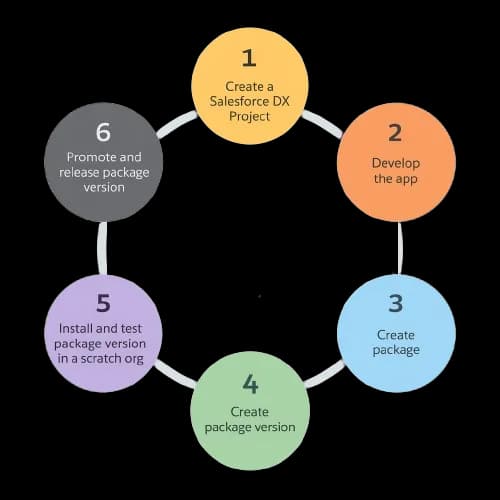
Second-Generation Managed Packages
Orgs that we need
-
Dev Hub Org:
-
When you're building unlocked packages with the Salesforce CLI, you need to connect them to a Dev Hub org. Think of the Dev Hub as the "home base" for your packages, it keeps track of everything.
-
If you're creating a package that will be used in production, make sure to use a Dev Hub that's in a production org. That way, your package is tied to a stable environment.
-
Here’s why the Dev Hub is important:
- It owns all the unlocked packages you create.
- It lets you link namespaces if you're building namespaced packages.
- You use it to run all your sf package commands.
-
Important: If your Dev Hub is in a scratch or trial org and that org expires, you won’t be able to update or reinstall your package. That’s why it’s best to use a production-level Dev Hub for anything long-term.
-
-
Namespace Org:
- When working with namespaces in Salesforce packaging, it’s essential to first create a dedicated org specifically to define your package’s namespace. This environment is commonly referred to as the namespace org.
- If your intention is to use the namespace exclusively for testing purposes, consider creating a disposable namespace, a temporary setup that can be discarded after use.
- Once the namespace org is created and the namespace is registered, the next step is to link the namespace org to your Dev Hub. This connection enables the Dev Hub to recognize and work with the namespace during package development and deployment workflows.
-
Other Org:
- Where you install the package.
Prepare to Build a Second-Generation Managed Package
Now we can create and install the package directly from the salesforce command line or vs code terminal. So first check that all package components are in the that project directory where you want to create a package.
- Go to setup and Enable dev hub in developer edition org.
- Also Enable Unlocked Packages and Second-Generation Managed Packages.
- Search for Name - Namespace Registries. (Namespace org must be different which will be linked with developer edition org).
- Now Click on 9 dots and Search for Namespace Registries and Click on button - Link Namescpace.
- Enter the username and password and Allow.
- Copy the Namespace Prefix value (Later we will use this in vs code sfdx-project.json file).
- Clone the git repo and open project in vs code.
- Authorize vs code project with dev hub org.
