In this blog, you will learn how to work with the Interest Tags - Browse Modal and Tag Category Hierarchy Visualization & Filtering features in Salesforce Financial Services Cloud, which make it easier than ever to search, assign, and manage client interest tags. These enhancements provide a streamlined way for wealth managers, bankers, and advisors to view multiple customer interests in one place, assign or remove tags during a client session, and explore the hierarchy of tag categories with greater clarity.
With persistent multi-tagging, users can save time while still capturing personalized details about each client. The improved visualization and filtering capabilities allow you to search tags by name, expand or collapse categories, and even sort tags within a hierarchy. Ultimately, these tools empower you to better understand client preferences and personalize engagement strategies effectively.
Interest Tags - Browse Modal
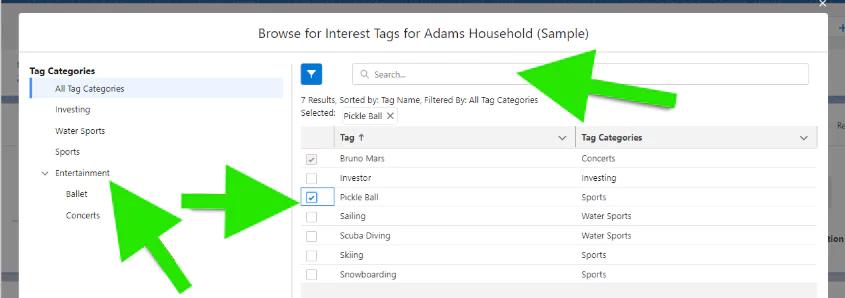
Persistent multi tagging, gives customers the ability to view and assign multiple customer interests We’re delivering a better search experience across tags and tag categories. Customers can better visualize and filter through the tag category hierarchy and it is easy to save and remove tags while in a session with a customer.
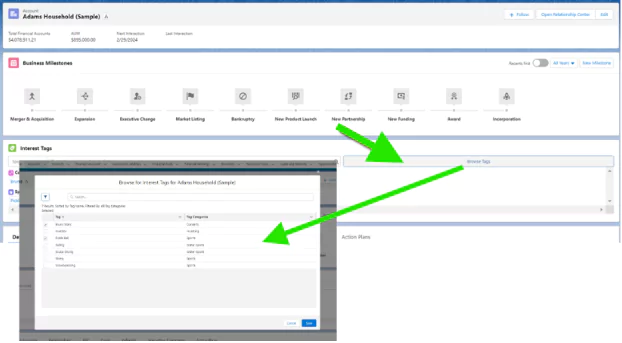
Tag Category Hierarchy - Visualization & Filtering
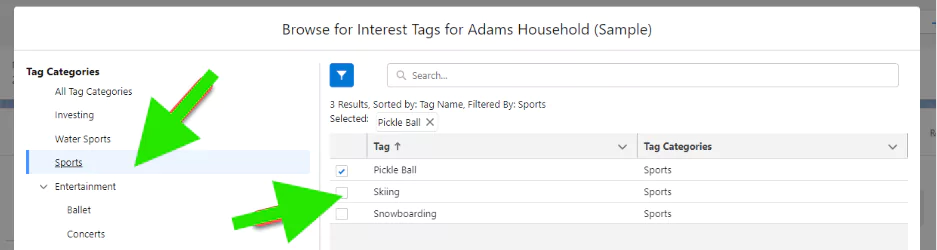
Click Filter by category to browse for Interest Tags.
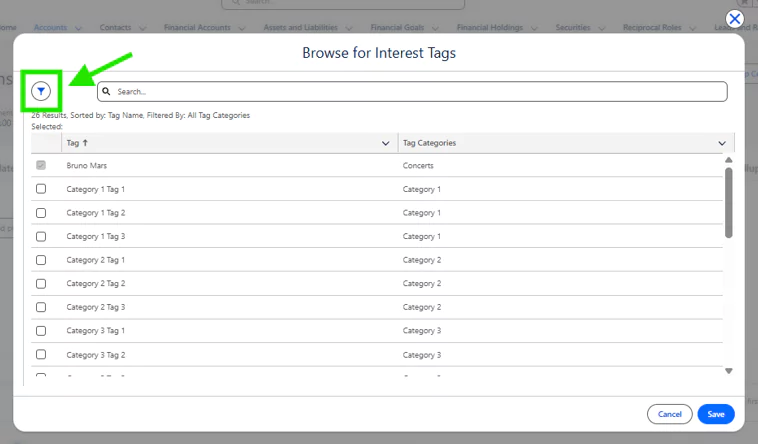
It’s easy to see what tags existed, and what tags have been newly selected and you can search for the name of the tag that you might be interested in. You can easily open those hierarchies and collapse them as well.