
You set up the Agentforce Service Assistant by creating an agent from the Service Assistant template in Agentforce Builder, defining topics, assigning service channels, turning on Service AI Grounding and the Service Assistant for Cases, and adding the component to your service pages. The assistant works in an assistive mode inside Service Cloud, giving human agents real-time guidance, recommended actions, and contextual insights during live case handling. This guide walks through each step, from prerequisites to testing.
What is the Agentforce Service Assistant?
The Agentforce Service Assistant is an AI-powered assistant embedded directly within Salesforce Service Cloud. It is designed to support customer service agents during live case handling by providing real-time guidance, recommended actions, and contextual insights based on the conversation and case data.
Unlike fully autonomous agents, the Service Assistant works in an assistive mode, helping human agents respond faster, stay compliant, and follow best practices while retaining full control over customer interactions.
Why Is the Agentforce Service Assistant Important?
Customer service teams often deal with:
- High case volumes
- Repetitive questions
- Complex processes and compliance requirements
- The need for fast, accurate responses
The Agentforce Service Assistant addresses these challenges by:
- Reducing average handling time
- Guiding agents with next-best actions
- Ensuring consistent and compliant responses
- Minimizing manual searching across knowledge articles and records
- Improving overall agent productivity and customer satisfaction
What Can the Service Assistant Do?
The Agentforce Service Assistant can:
- Analyze case context and conversation history
- Recommend relevant actions and flows
- Suggest knowledge articles or answers
- Guide agents step-by-step through resolution processes
- Trigger Salesforce actions with agent approval
- Adapt suggestions dynamically as the conversation evolves
Overview of the Setup Workflow
Setting up the Agentforce Service Assistant typically involves:
- Enabling Agentforce features
- Configuring service assistant settings
- Defining topics and actions
- Connecting data and automations
- Assigning the assistant to service channels
- Testing and refining behavior
- Turning on AI Grounding for Cases
- Turning on the Service Assistant for Cases
- Adding the component to the page
- Service Assistant in Action
Step-by-Step: Setting Up the Agentforce Service Assistant
1. Enable Agentforce and Prerequisites
Before configuring the Service Assistant, ensure the following prerequisites are met.
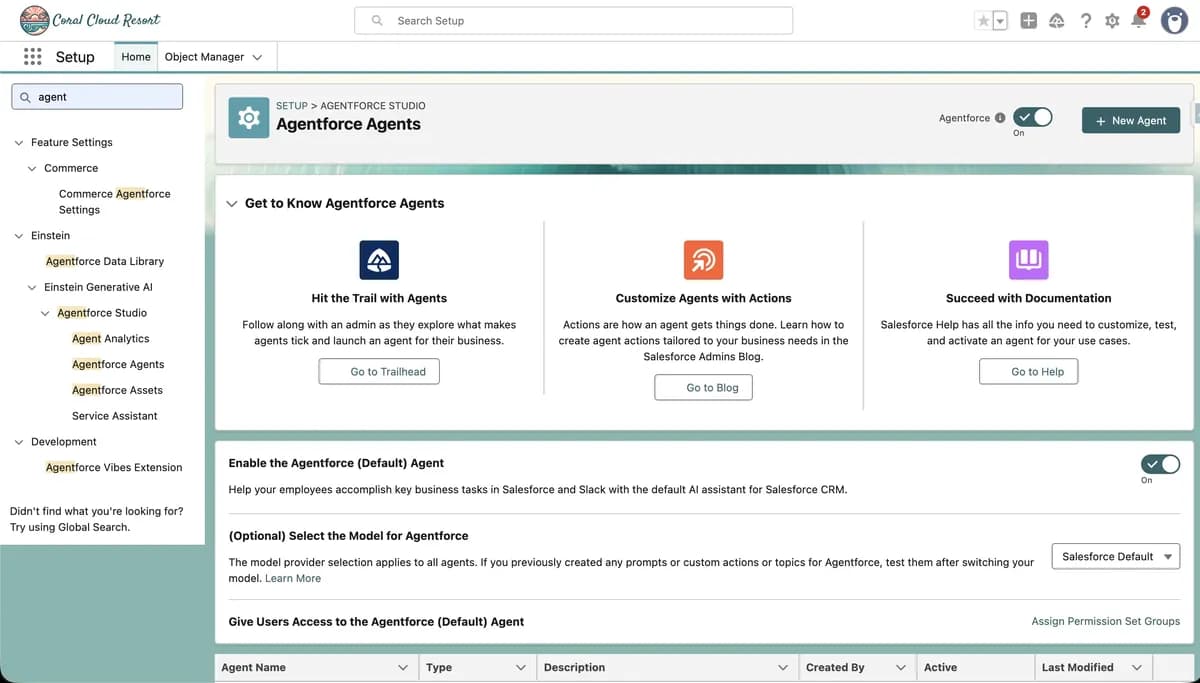
1.1 Enable Agentforce
Ensure Agentforce is enabled in your Salesforce org.
1.2 Set Up Service Cloud
Verify that Service Cloud is set up with Cases, Queues, and Omni-Channel.
1.3 Confirm Permissions
Confirm required permissions for admins and service agents.
This ensures the assistant can access case data, knowledge, and automation tools.
2. Create or Select a Service Assistant
2.1 Navigate to Agentforce Builder
Navigate to Agentforce Builder from Setup.
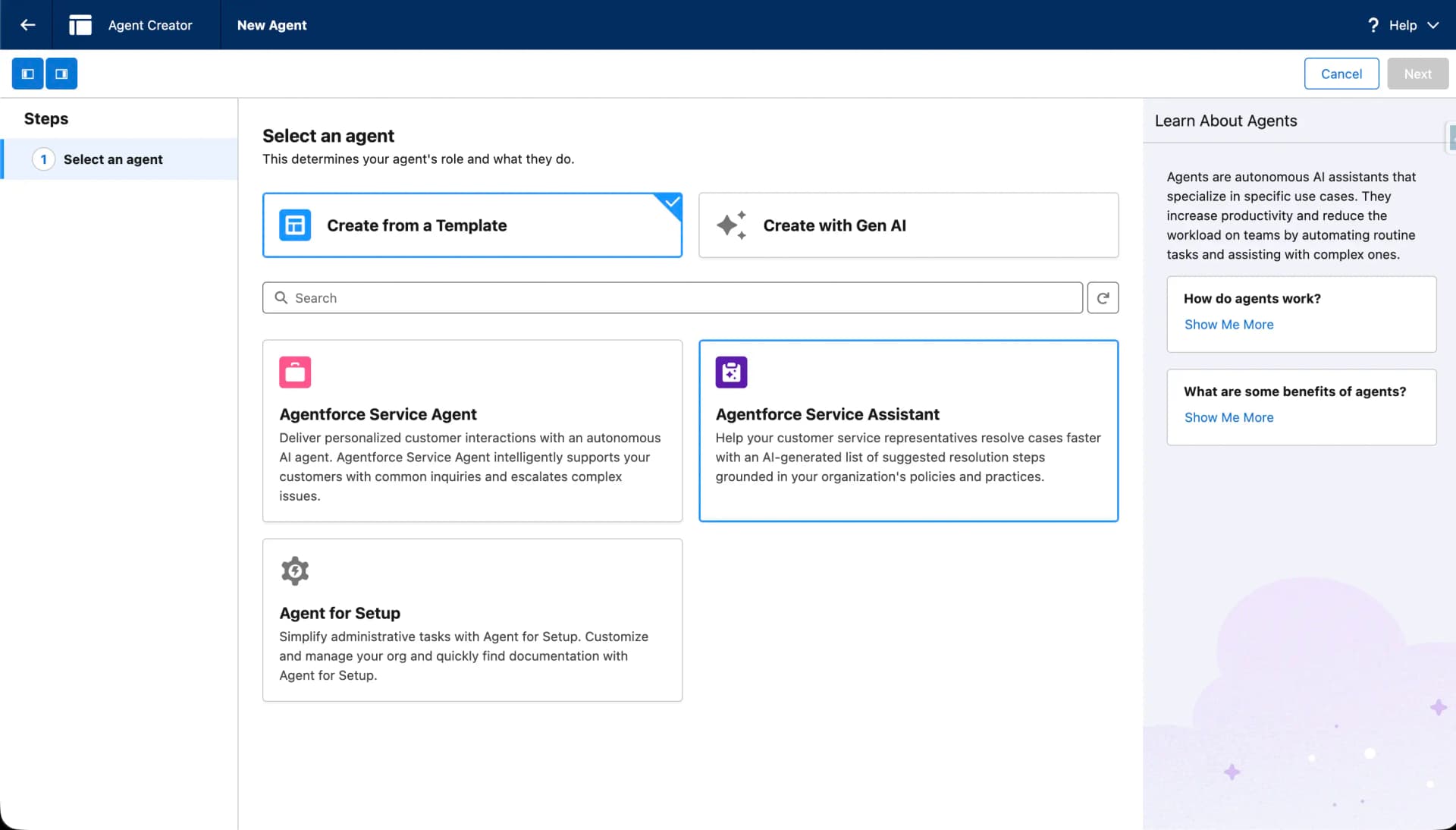
2.2 Create or Select Agent
Create a new agent using the Service Assistant template, or select an existing one.
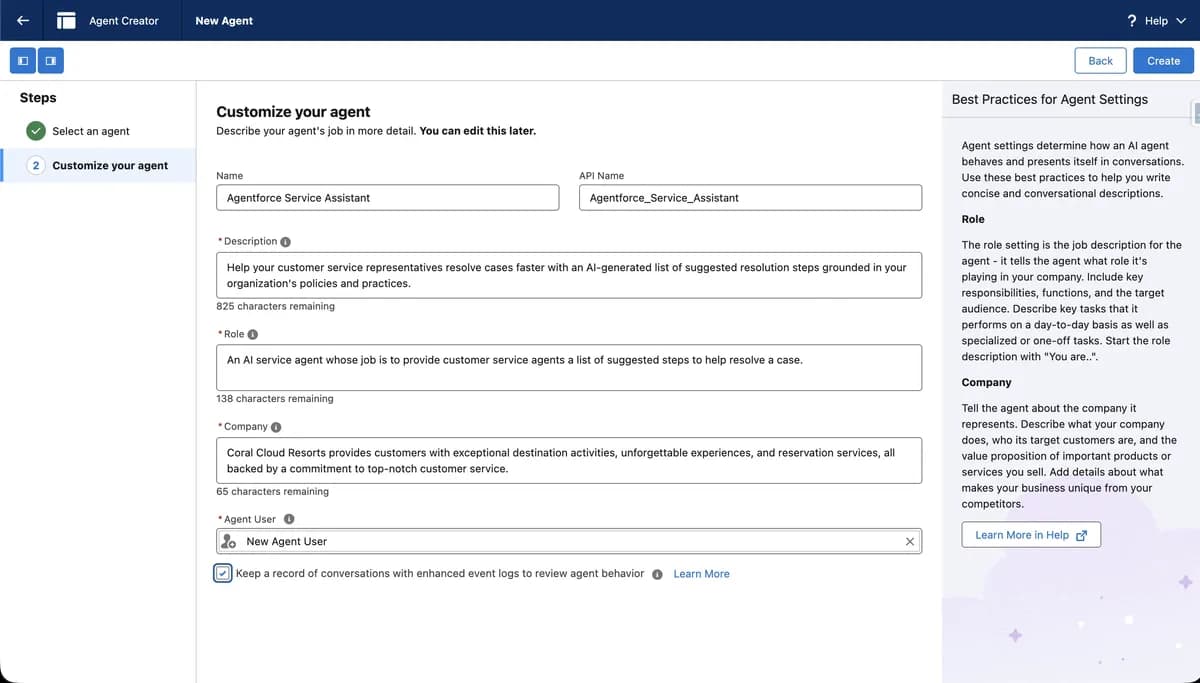
2.3 Provide Name and Description
Provide a clear name and description that defines the assistant’s purpose (for example, “Case Resolution Assistant”).
This template is optimized for assisted service workflows rather than autonomous conversations.
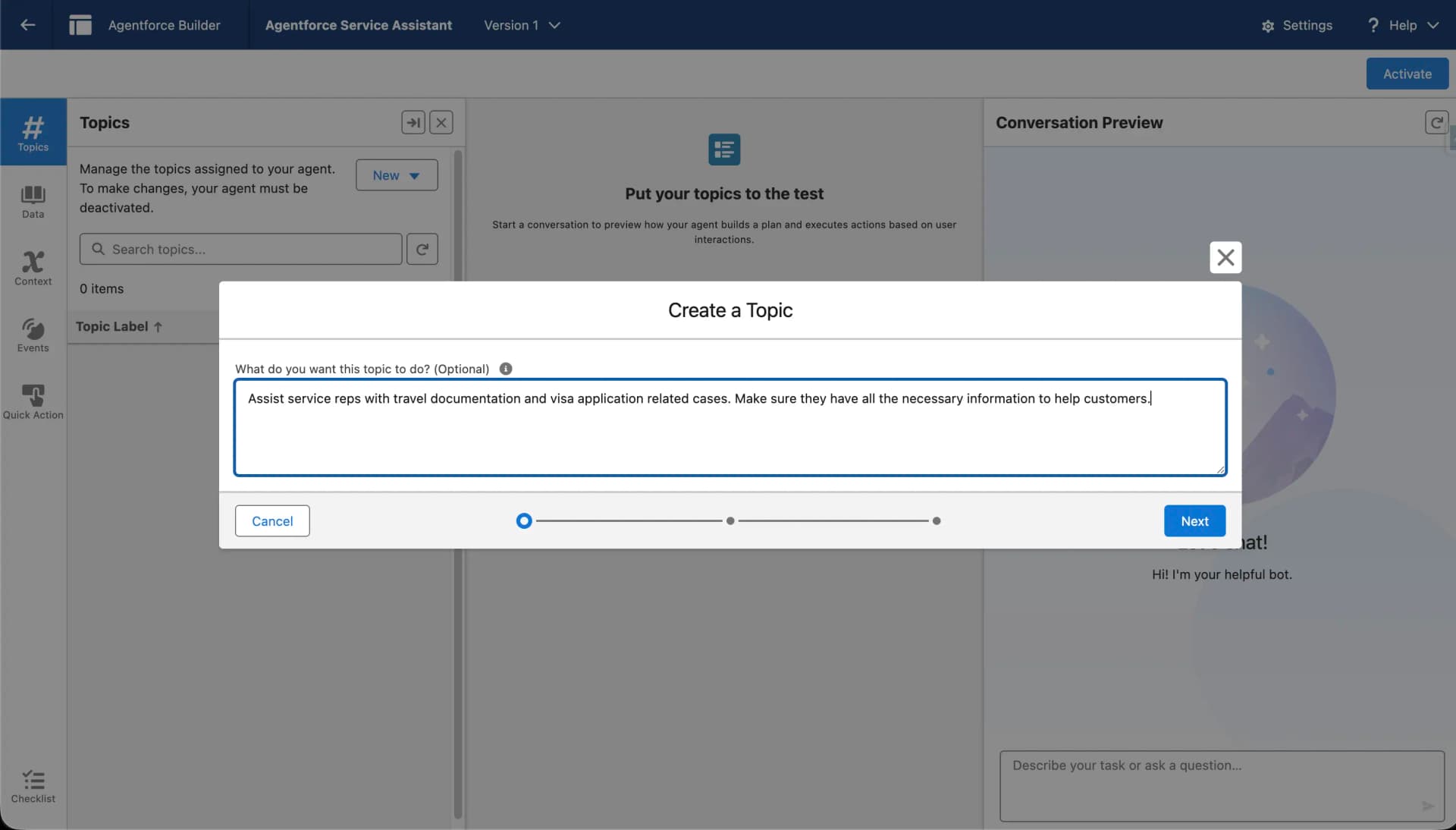
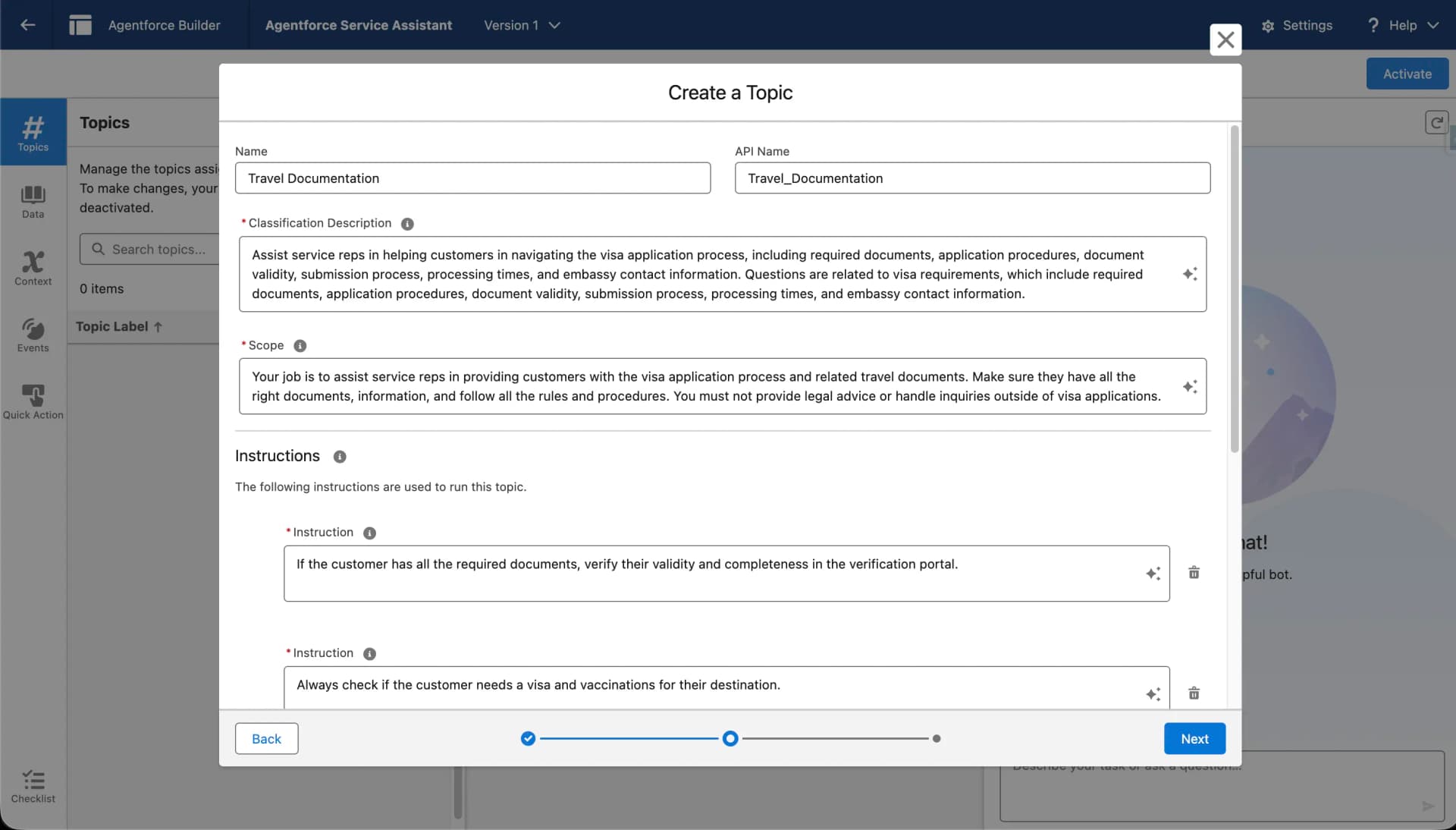
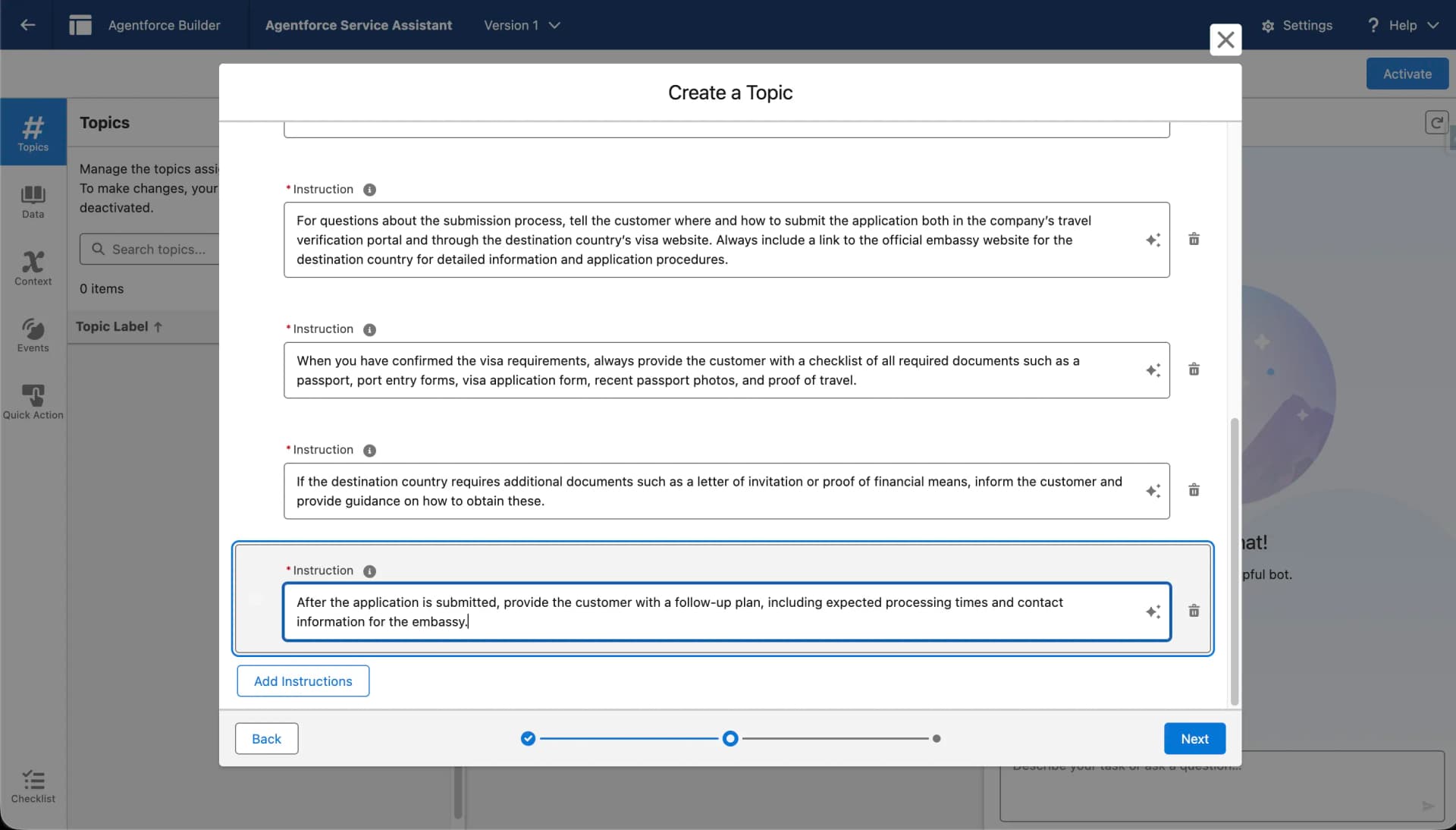
3. Define Topics and Use Cases
Topics define when the Service Assistant should step in.
Examples include:
- Case status updates
- Order or entitlement lookup
- Refund or escalation guidance
- Troubleshooting steps
- Policy or compliance checks
Each topic includes instructions that guide how the assistant should interpret context and respond.
Free newsletter
Get Salesforce insights delivered weekly
Join 500+ Salesforce professionals and stay ahead of the curve.
No spam. Unsubscribe any time.
4. Configure Guidance and Recommendations
Define how the Service Assistant guides agents in an advisory-only mode. It does not execute automations, update records, or trigger backend logic. Instead, it provides text-based recommendations for agent decision-making, such as suggesting next steps, recommending knowledge articles, providing compliance reminders, summarizing case context, and offering structured guidance for complex scenarios. All guidance is displayed as read-only suggestions in the Service Console, with the human agent retaining full control.
5. Assign Channels and Service Consoles
Choose where the Service Assistant will be available, such as the Service Console, Chat or Messaging, Experience Cloud, or other supported service channels. Map the assistant to appropriate queues and Omni-Channel configurations so it activates only in relevant service contexts.
Save and Activate the Agent
6. Test and Validate the Assistant
Before enabling the assistant for agents, test the assistant to ensure it provides helpful guidance without disrupting workflows.
- Use Conversation Preview to simulate service scenarios.
- Validate topic selection and action recommendations.
- Adjust instructions, guardrails, and prompts based on test outcomes.
- Optionally use the Testing Center for structured validation.
Testing ensures the assistant provides helpful guidance without disrupting agent workflows.
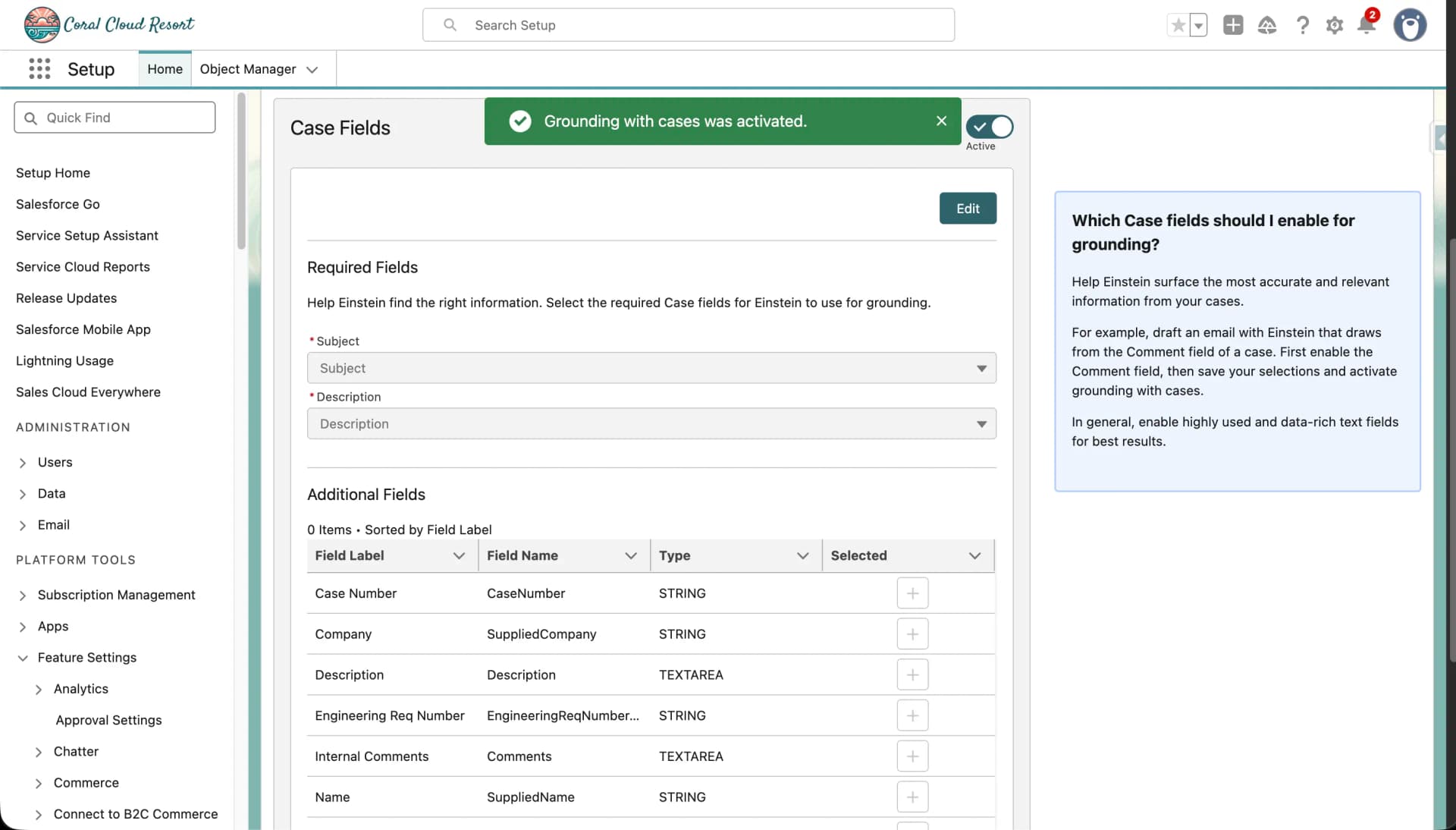
7. Turn on Service AI Grounding for Cases
Activate the Service Assistant specifically for case handling in your Salesforce org.
- Go to Service AI Grounding
- Turn on Service AI Grounding for Case Fields
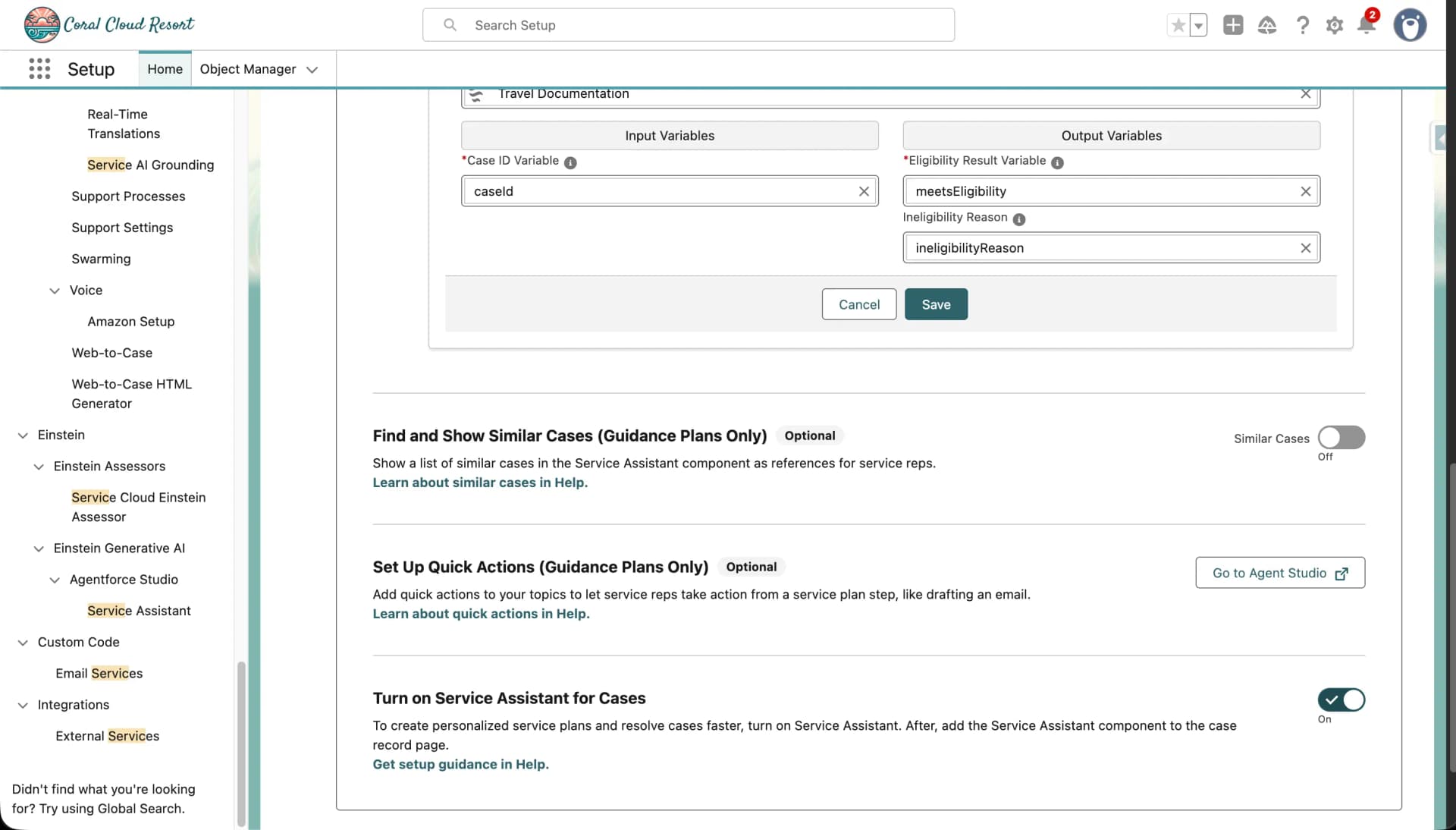
8. Turn ON Service Assistant for Cases
9. Add the Component to the Page
Integrate the Service Assistant component into the relevant Salesforce pages or consoles.
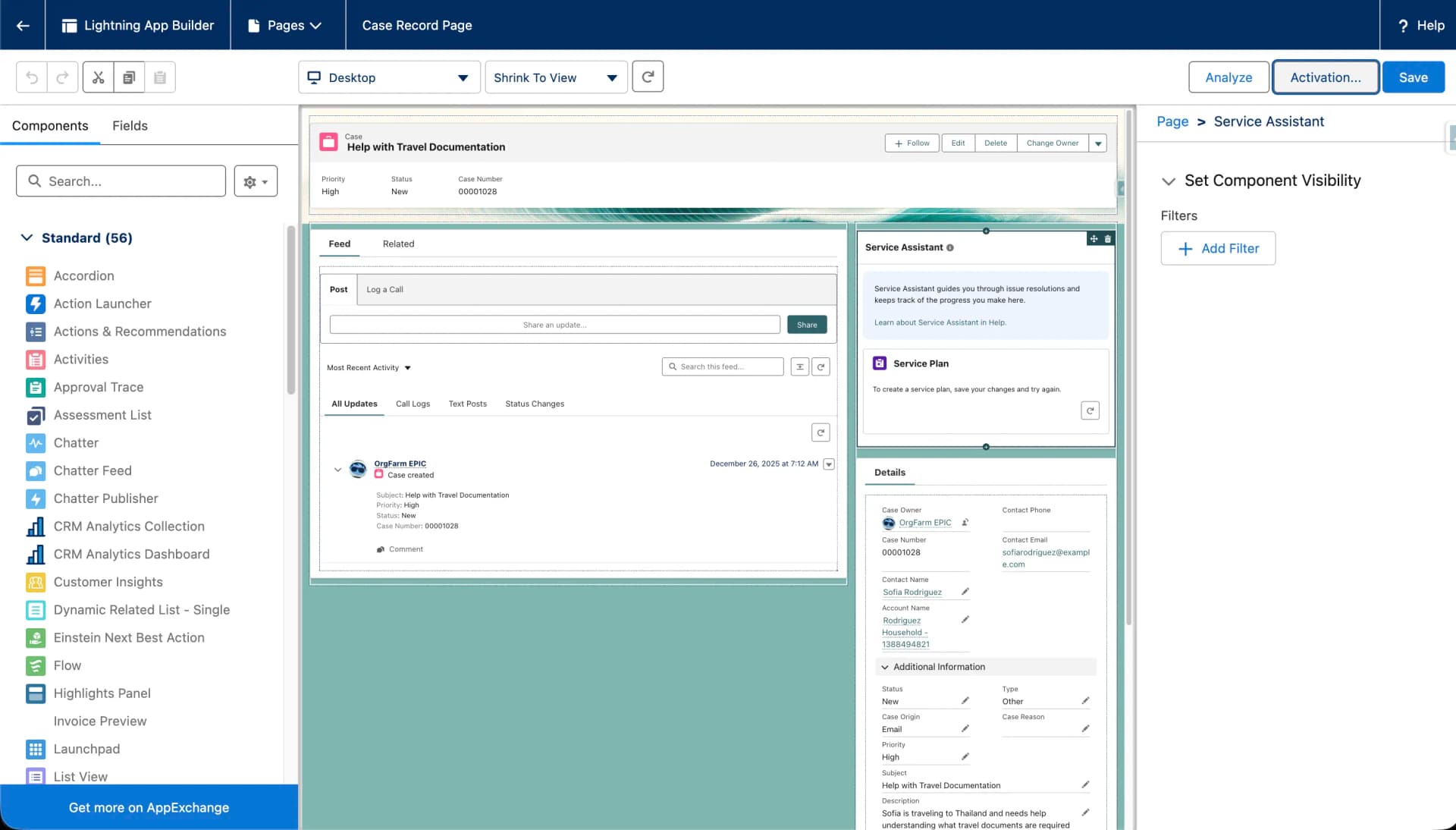
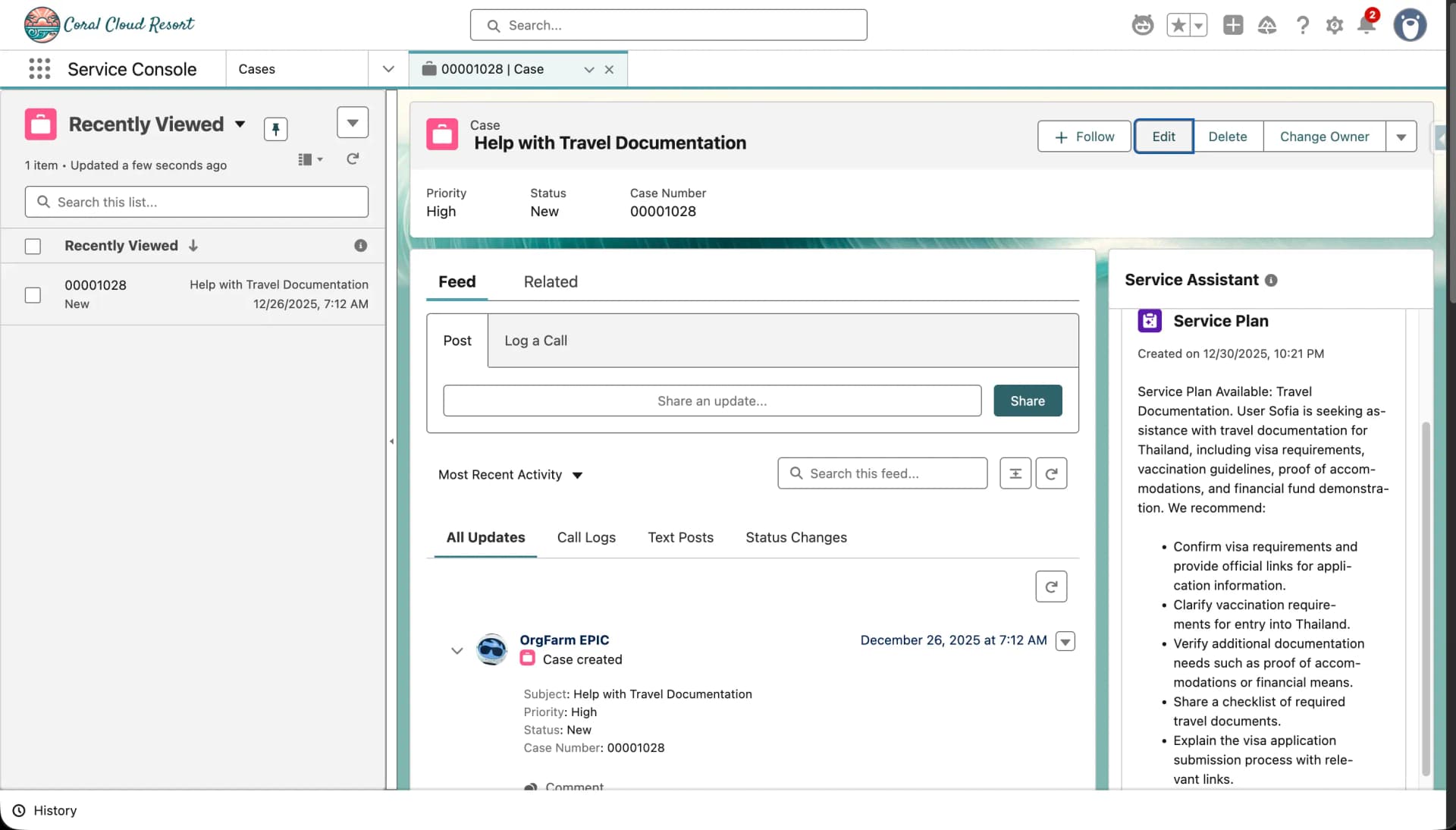
10. Service Assistant in Action
Showcase the Service Assistant in action during a service interaction to verify functionality.
Real-World Use Cases
The Agentforce Service Assistant is especially useful for:
- New agent onboarding and guided resolution
- Compliance-heavy industries (finance, healthcare, insurance)
- High-volume support teams
- Standardized service processes
- Reducing dependency on senior agents
Best Practices for Implementation
- Start with a small, high-impact use case
- Use clear and scoped topics
- Prefer guided actions over full automation
- Test frequently in sandbox environments
- Gather agent feedback and iterate continuously
Conclusion
The Agentforce Service Assistant enhances customer service by combining AI intelligence with human judgment. By guiding agents in real time, recommending actions, and surfacing relevant insights, it helps teams resolve cases faster, more accurately, and more consistently. When set up thoughtfully, it becomes a powerful co-pilot for service agents, improving both operational efficiency and customer experience.
Output
Frequently Asked Questions
Is the Agentforce Service Assistant autonomous?
No. Unlike fully autonomous agents, the Service Assistant works in an assistive, advisory-only mode. It does not execute automations, update records, or trigger backend logic; its guidance appears as read-only suggestions in the Service Console, and the human agent retains full control over customer interactions.
What are the prerequisites for setting up the Service Assistant?
Agentforce must be enabled in your Salesforce org, Service Cloud must be set up with Cases, Queues, and Omni-Channel, and admins and service agents need the required permissions so the assistant can access case data, knowledge, and automation tools.
Where can the Service Assistant be made available?
You can assign it to the Service Console, Chat or Messaging, Experience Cloud, or other supported service channels, and map it to the appropriate queues and Omni-Channel configurations so it activates only in relevant service contexts.
How do you test the Service Assistant before rolling it out?
Use Conversation Preview to simulate service scenarios, validate topic selection and action recommendations, and adjust instructions, guardrails, and prompts based on the outcomes. The Testing Center can optionally be used for structured validation.
Need expert help building your Agentforce Service Assistant? Phenoble specialises in Agentforce implementation for service teams, including contact centre deployments with the Agentforce Contact Centre. Our architects handle everything from topic configuration to Einstein Trust Layer governance. Book a free 30-min audit →
