Add a Global Callable Class and Register it as a Tool in MCP Server
In Node/JS there’s no Callable interface like Apex, but we can mirror the same pattern with a class that has a call(action, args) dispatcher and register one MCP tool in server.js that routes to it.
Inside my-mcp-server/server.js, we created a class called Extension. The Extension class exposes two helpers:
- concatStrings: repeats a string
- squareNumbers: squares a number
We register an MCP tool named extensionCall that takes an action and certain arguments. The handler validates input, routes to the right method, and returns the result as MCP text content. If anything fails, it returns a clean MCP error response. This tool is a simple, reliable test for custom MCP tooling.
Here’s the JS/MCP equivalent of your “callable” class pattern, with a single call dispatcher and an MCP tool that routes to it: Paste the following code in server.js after mcp server initialisation.
server.jsclass Extension {
  concatStrings(stringValue) {
    return String(stringValue) + String(stringValue);
  }

  squareNumbers(decimalValue) {
    const value = Number(decimalValue);
    return value * value;
  }

  call(action, args) {
    switch (action) {
      case "concatStrings":
        return this.concatStrings(args?.stringValue);
      case "squareNumbers":
        return this.squareNumbers(args?.decimalValue);
      default:
        throw new Error("Method not implemented");
    }
  }
}

const extension = new Extension();
globalThis.extension = extension;

mcpServer.registerTool(
  "extensionCall",
  {
    description: "Dispatch to Extension methods by action name.",
    inputSchema: z.object({
      action: z.string().describe("Method name to execute."),
      args: z.record(z.any()).optional().describe("Arguments for the method."),
      stringValue: z.string().optional().describe("Top-level string input."),
      decimalValue: z.number().optional().describe("Top-level numeric input.")
    })
  },
  async ({ action, args, stringValue, decimalValue }) => {
    try {
      const payload = args ?? {};
      if (action === "concatStrings") {
        const value = payload.stringValue ?? stringValue;
        if (value === undefined) {
          throw new Error("Missing stringValue.");
        }
        const result = extension.call(action, { stringValue: value });
        return {
          content: [{ type: "text", text: String(result) }]
        };
      }
      if (action === "squareNumbers") {
        const value = payload.decimalValue ?? decimalValue;
        if (value === undefined) {
          throw new Error("Missing decimalValue.");
        }
        const result = extension.call(action, { decimalValue: value });
        return {
          content: [{ type: "text", text: String(result) }]
        };
      }
      const result = extension.call(action, payload);
      return {
        content: [{ type: "text", text: String(result) }]
      };
    } catch (err) {
      return {
        isError: true,
        content: [{ type: "text", text: err?.message || "Call failed." }]
      };
    }
  }
);
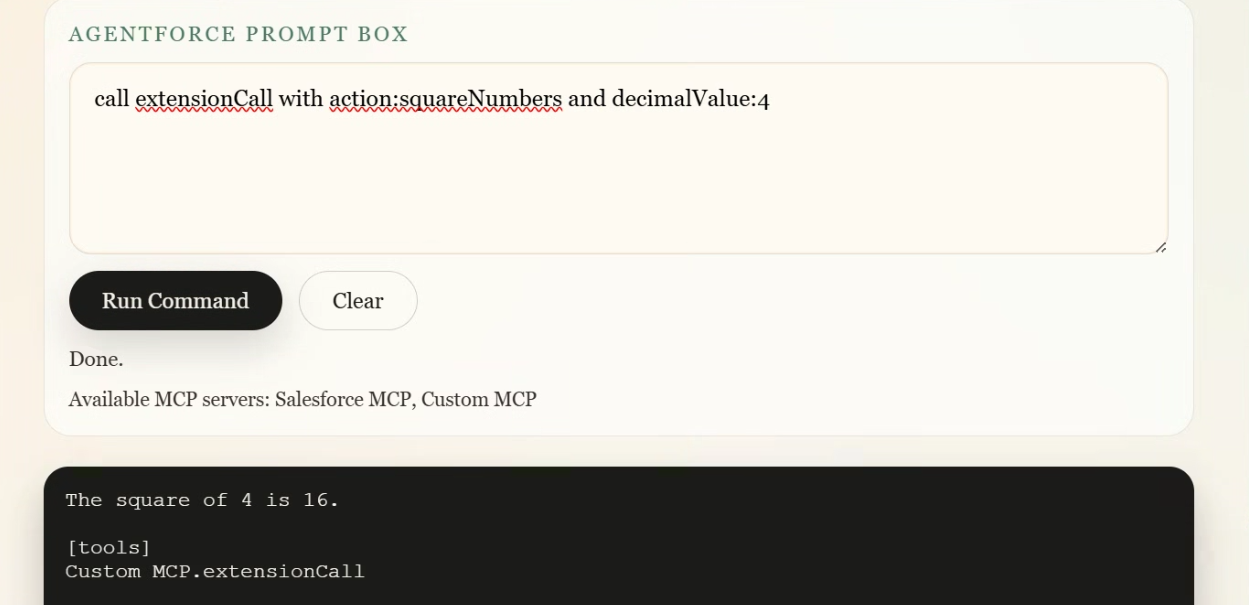
Here’s how the “callable” tool works from the UI and what it returns.
Tool name: extensionCall
It takes:
{
  "action": "concatStrings",
  "args": { "stringValue": "co" }
}
The MCP tool receives action + args. It calls extension.call(action, args). That dispatches to concatStrings() or squareNumbers().
Example inputs and outputs:
-
concatStrings:
- Input: {"action":"concatStrings","args":{"stringValue":"co"}}
- Output text: coco
-
squareNumbers:
- Input: {"action":"squareNumbers","args":{"decimalValue":4}}
- Output text: 16
Now use the following prompts to see the output:
call extensionCall with action:concatStrings and stringValue:co
call extensionCall with action:squareNumbers and decimalValue:4